
Odoo 20 has arrived, bringing one of the most significant shifts we have seen in the platform in recent years.
As an Odoo Partner, we've spent some time going through the release in detail.
There are hundreds of individual changes across finance, inventory, manufacturing, field service, payroll, websites and the broader Odoo framework. Some are useful refinements. Others materially change what businesses can expect from an ERP system.
The biggest story, however, is not another redesigned screen or additional report.
It is Agentic AI.
Odoo 20 pushes artificial intelligence beyond the familiar chatbot model and into the actual operation of the business. AI can increasingly work with company data, create and update records, participate in automated processes and interact with other systems. Alongside that shift are significant improvements to finance, operations, field service and Australian payroll, as well as a new approach to user licensing that could materially change the economics of an Odoo implementation.
We have reviewed the release from a practical business perspective. These are the changes we believe matter most.
A note on Odoo 20: This article reflects information available as at 24 September 2026. As with any new software release, functionality and regional availability may continue to evolve. Confirm specific requirements with Springbrook before implementation.
Agentic AI
Most businesses have now experienced generative AI in some form. Someone opens ChatGPT, asks a question, receives an answer and decides what to do with it.
Agentic AI is different.
Instead of merely responding to a person, an AI agent can be given tools, permissions and instructions that allow it to perform work inside a system.
That distinction is fundamental.
With Odoo 20, AI agents can create records, modify existing records, work from uploaded files and be invoked by automated or scheduled actions. Odoo also allows automation conversations to be reviewed so teams can understand what an agent did and refine its behaviour.
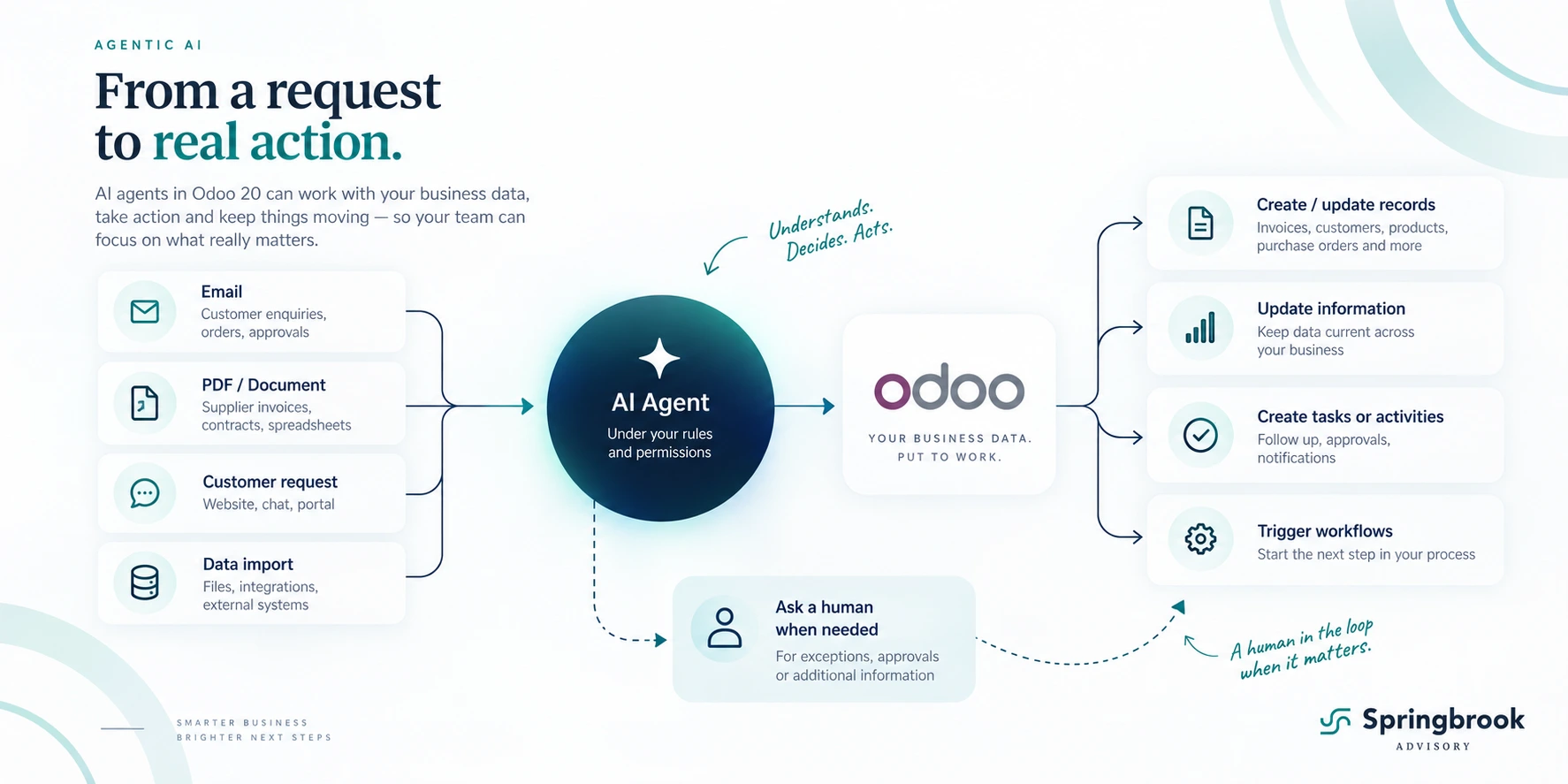
At Odoo Partner Day, this shift was described very simply: agents have moved beyond answering questions and can now write to and create within the database. Demonstrations included an agent creating a customer invoice from a natural-language instruction and subsequently modifying that invoice when asked.
For many businesses, this may be the first time AI starts to look less like a chatbot and more like a digital employee operating within a defined role.
That does not mean handing an AI unrestricted control of a business. The useful model is almost the opposite: give an agent a narrow responsibility, the information it needs, appropriate system permissions and clear rules about when a human needs to become involved.
A supplier document could arrive and be interpreted before the relevant information is created in Odoo. An agent could periodically review overdue activities or transactions and prepare the next actions. Another might maintain CRM information, process routine administrative requests or investigate an operational exception before escalating it to a person.
The important change is that the final step no longer has to be:
“Here is my answer. Now a human needs to do something.”
The agent can potentially do the work itself.
The important shift in Odoo 20 is that AI can move from advising the business to participating in the work.

Odoo 20 also introduces Model Context Protocol (MCP) connectivity, opening the database to compatible external AI tools and agents rather than limiting the AI layer to a single closed environment.
That could ultimately become just as important as Odoo's own agents. Businesses will increasingly be able to connect specialist AI tools to the operational information already contained in their ERP rather than exporting data into disconnected systems.
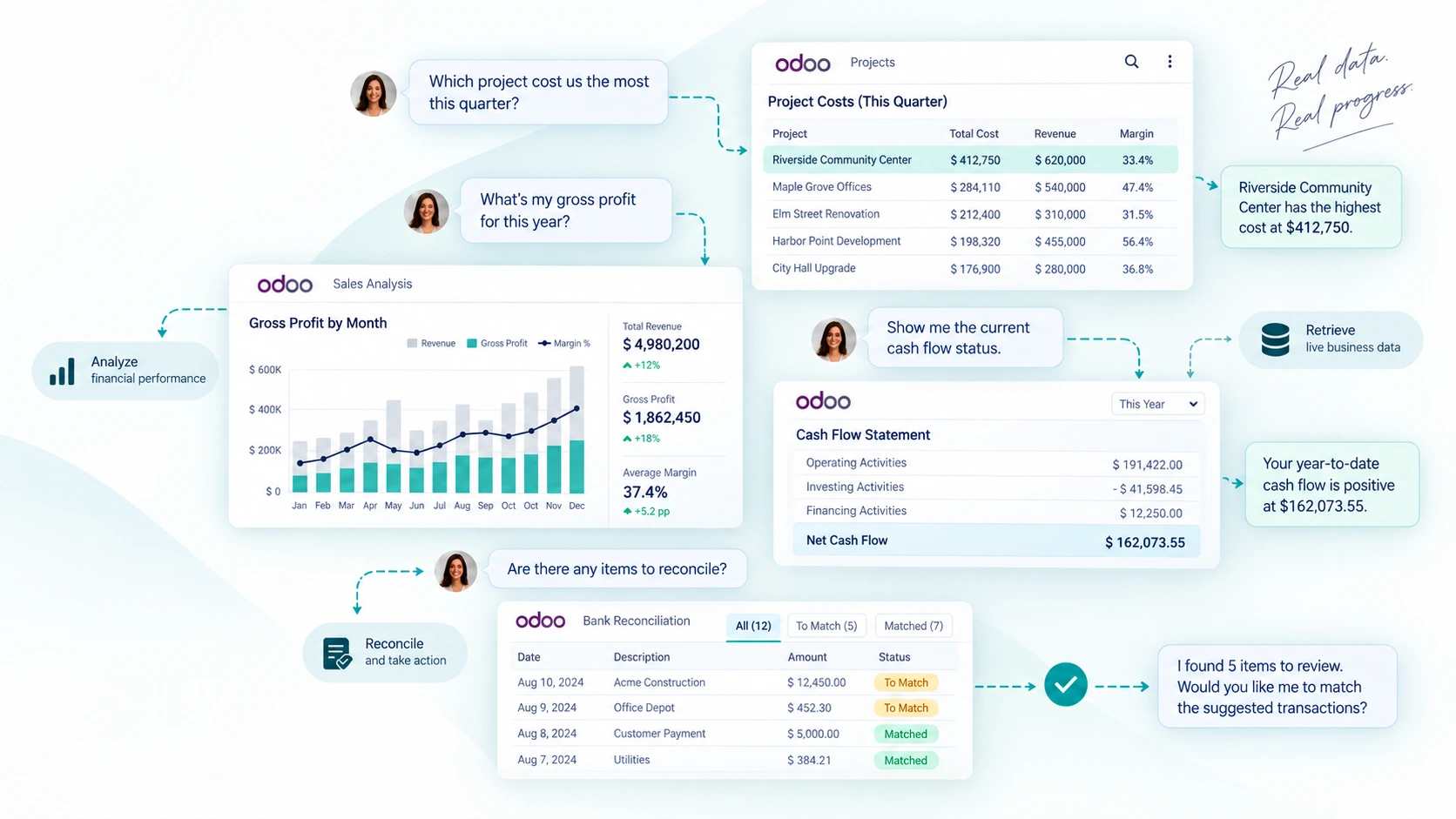
There are AI improvements elsewhere too. The Website Assistant can create and edit pages, use existing database information, work with imagery and change forms or navigation. AI can assist with documents and social content, and Odoo can automatically select an appropriate model from a chosen provider.
We think Agentic AI deserves considerably more than a paragraph in a release article, so we will be publishing a separate deep dive into what Agentic AI actually is, where it makes sense in a business and where it does not.
For now, this is the feature in Odoo 20 we would pay the most attention to.
Full Odoo AI breakdown coming soon
Subscribe to keep up to date
Finance
AI may dominate the headlines, but some of the most immediately useful improvements are in Accounting.
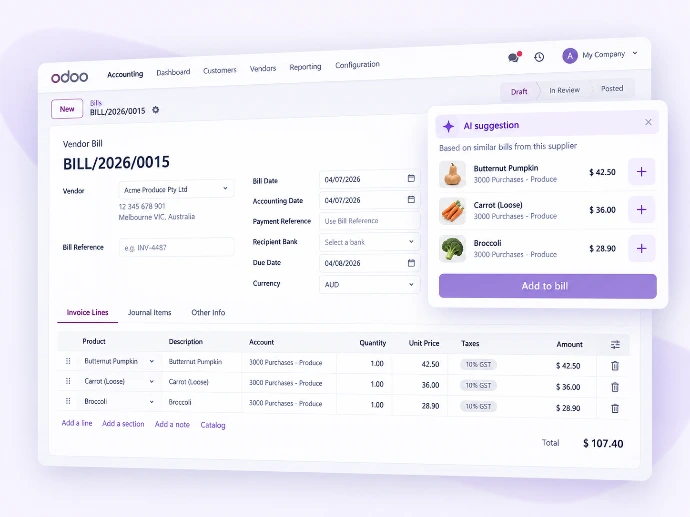
Odoo has expanded bill automation so that when a supplier bill is entered or imported, historical information can be used to suggest the relevant product, account, tax and analytic treatment. The Partner Day demonstration also showed an autocomplete workflow based on previous bills, reducing the amount of repetitive coding required for recurring supplier transactions.
Reconciliation has also received practical improvements. New tools can identify missing bank transactions, detect likely duplicates and rerun automatic reconciliation on demand. Duplicate bills are now separated between high-confidence warnings and potential duplicates that deserve review before posting.
Australian businesses also gain a new bank synchronisation option through Basiq, expanding Odoo's local open-banking capability.
Purchase-order matching is stronger too, with better visibility over what has matched between a bill and PO, clearer warnings when quantities or prices differ and the ability to reverse an incorrect match.
These are not dramatic changes individually. Together, however, they continue pushing the finance function toward an exception-based workflow: let the system handle the repetitive transactions and direct people toward the items that actually need judgement.
Smarter Bills
Odoo can use previous bills to predict products, accounts, taxes and analytic coding, reducing repetitive data entry.
Smarter Bills
Odoo can use previous bills to predict products, accounts, taxes and analytic coding, reducing repetitive data entry.
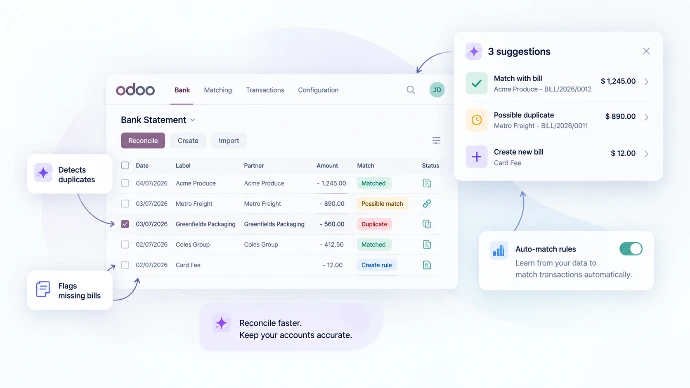
Clearer Reconciliation
Deploy AI to spot missing or duplicate bank transactions and rerun automatic reconciliation when needed.
Clearer Reconciliation
Deploy AI to spot missing or duplicate bank transactions and rerun automatic reconciliation when needed.
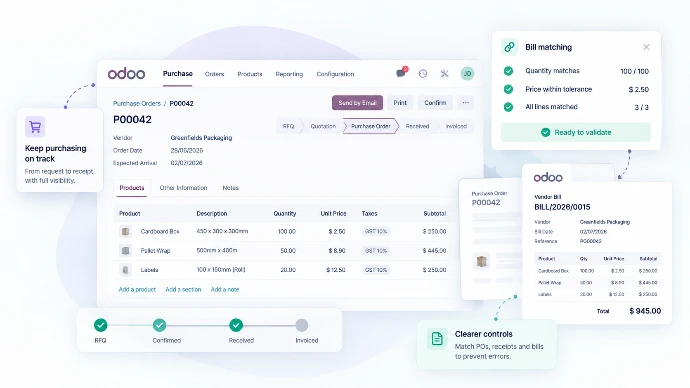
Better Purchasing Controls
See what has matched between a purchase order and supplier bill, with clearer quantity and price variance warnings.
Better Purchasing Controls
See what has matched between a purchase order and supplier bill, with clearer quantity and price variance warnings.
There are deeper accounting changes as well. Parent accounts replace account groups as the hierarchy used to structure the chart of accounts, while account codes can now be optional. Journal items can also be split more easily across quantities or accounts, including during asset creation.
For finance teams already operating within Odoo, this release contains quite a lot to explore beyond the AI headline.
Australian Payroll
Australian Payroll is another area receiving substantial attention in Odoo 20.
The payroll framework itself has been reworked, including changes to time types and the way time off interacts with payroll calculations. Odoo's Australian team has also been actively testing the local solution with live and beta customers.
There is plenty to like here, particularly for businesses that want employee records, leave, attendance, planning, accounting and payroll to exist within the same environment.
But Australian payroll is complicated, and this is one part of the release where the right answer genuinely depends on the customer's workforce.
At Partner Day, Odoo walked us through several Australian payroll scenarios that are not yet fully handled natively. These include replacement rates when an employee temporarily performs a higher-paid role, some non-standard working schedules such as a 9-day fortnight, and aspects of award management.
There are also current gaps around particular termination scenarios, cashing out leave and fringe benefits. Odoo explicitly distinguishes its roadmap toward Award Management from full Award Interpretation.
That does not make Payroll a weak part of Odoo. It simply means payroll needs to be scoped properly rather than assumed.
As Odoo partners, we’ve been given a much closer look at where Australian Payroll is today and where it is still evolving.
Odoo has been clear with us that, while the Australian payroll framework has come a long way, there are still some business cases that need careful scoping. One example is replacement rates — where an employee temporarily steps into a higher-paid role and needs to be paid at that higher rate for the shift. That scenario is not yet handled natively.
There are also limitations around parts of Award Management, particularly where payroll treatment changes because of an award or industrial obligation. Odoo has been careful to distinguish this from full Award Interpretation, which is not the current focus.
Not yet.
Odoo has shared with us a number of Australian examples that are still being worked on. One was a full-time employee working 38 hours across a 9-day fortnight. At present, the calculation assumes a standard 10-day fortnight, which can affect the hourly rate calculation.
The good news is that support for different working schedules is already on the near-term roadmap, along with other Australian payroll refinements.
There are still some edge cases around termination payments, leave and fringe benefits.
Odoo has shared with partners that areas still being developed include scenarios such as delayed or multiple ETP payments, early retirement, invalidity, cashing out leave and some fringe-benefit workflows.
For fringe benefits in particular, the process can currently be handled manually for compliance, but there is no dedicated FBT report and no direct accounting link for that workflow today.
Some of these items, including ETP handling, are listed as near-term priorities, while others such as cashing out leave and fringe benefits sit further down the roadmap.
Probably — but it needs to be scoped properly first.
For many Australian businesses, Odoo Payroll can be a strong fit, particularly where payroll sits alongside Employees, Time Off, Attendances, Planning and Accounting. The main consideration is whether your workforce has any of the more complex scenarios Odoo has told partners are still being developed, such as certain award-related rules, replacement rates, alternative working schedules or specific termination cases.
In practice, that means the right answer depends on how your people are paid, how your awards and working patterns operate, and how much payroll complexity exists behind the scenes.
In some cases, native Odoo Payroll will be the right tool. In others, it may make more sense to keep a specialist payroll platform and integrate it with Odoo.
The important part is selecting the right architecture before implementation starts.
For some businesses, native Odoo Payroll may now be a strong fit. For businesses with complicated awards, rostering or payroll conditions, a specialist payroll product integrated with Odoo may still be the better architecture.
That flexibility is important. The objective should not be to force every process into one application; it should be to build the best connected system for the business.
Operations
Inventory and manufacturing continue moving toward more sophisticated operational use cases.
Odoo 20 can suggest minimum and maximum quantities for reordering rules using demand history, desired stock coverage and ordering frequency. Rather than every replenishment rule beginning with someone's best guess, the system can provide a data-informed starting point.
Inventory valuation has also become more responsive to what happens after goods are received. If the final cost changes because of landed costs or a supplier invoice differing from the original purchase price, Odoo can update the value of goods that have already been delivered and, where perpetual accounting is used, the associated cost of sales.
For wholesalers, importers and manufacturers, that is a far more realistic reflection of how inventory costs actually emerge.
Traceability reporting now provides a clearer view of upstream and downstream lot or serial movements in the same report. That will be particularly relevant to food, manufacturing and other environments where the ability to quickly identify where a batch came from and where it went is operationally critical.
Manufacturing also receives continuous-production functionality, allowing later operations to start once part of the required quantity has become available rather than forcing every stage to wait for the complete preceding batch.
These changes are not attempting to turn every business into a highly complex manufacturing environment. They do, however, make Odoo more credible for organisations that have grown beyond basic stock-in, stock-out processes and need their ERP to reflect real operational behaviour.
Field Service
Field Service is no longer a standalone application in Odoo 20. Its functionality has been brought into Planning, putting workforce scheduling, resources and service work much closer together.
That consolidation comes with a broader range of capabilities for service businesses. Odoo can consider customer location when planning work, show technicians and jobs on maps, optimise routing, track customer equipment and intervention history, record products used on site and charge travel fees.
For a company running technicians, installers or maintenance teams, the potential workflow becomes increasingly complete:
request → schedule → dispatch → service → materials → history → invoice.
This is one of the areas where the wider Odoo proposition becomes particularly compelling. A field-service business does not necessarily need one platform for jobs, another for stock, another for customer records and another for finance. Those processes can operate on the same underlying information.
CRM & Communications
One of the most significant changes in Odoo 20 is not actually inside CRM itself. It is everything now being built around the customer record.
Odoo has always been strongest when a business uses several parts of the platform together. A lead can become an opportunity, quotation, sale, invoice and ongoing customer relationship without moving between disconnected systems. Odoo 20 pushes that idea much further by bringing more of the actual customer conversation into the same environment.
CRM itself gets some useful improvements. Lead distribution can now keep salespeople permanently in rotation, place them in rotation with a limit or temporarily remove them altogether. Lead generation is also moving from Clearbit to Dun & Bradstreet, which Odoo says provides broader global company coverage and better-quality data. Sales teams can switch between pipelines more easily, while existing subscriptions can be accessed directly from a lead to create renewals or upsell quotations. Contacts also gain enrichment tools and a new hierarchical view.
Those changes are useful, but the bigger story is communications.
Phone is becoming a genuine business telephony platform. Odoo 20 introduces a visual call-flow designer for incoming calls, with extensions, call menus, queues, time- and location-based steps and other PBX-style functionality. Calls can be routed to individual users or teams, sent to voicemail and handled through configurable menu options rather than simply ringing one person.
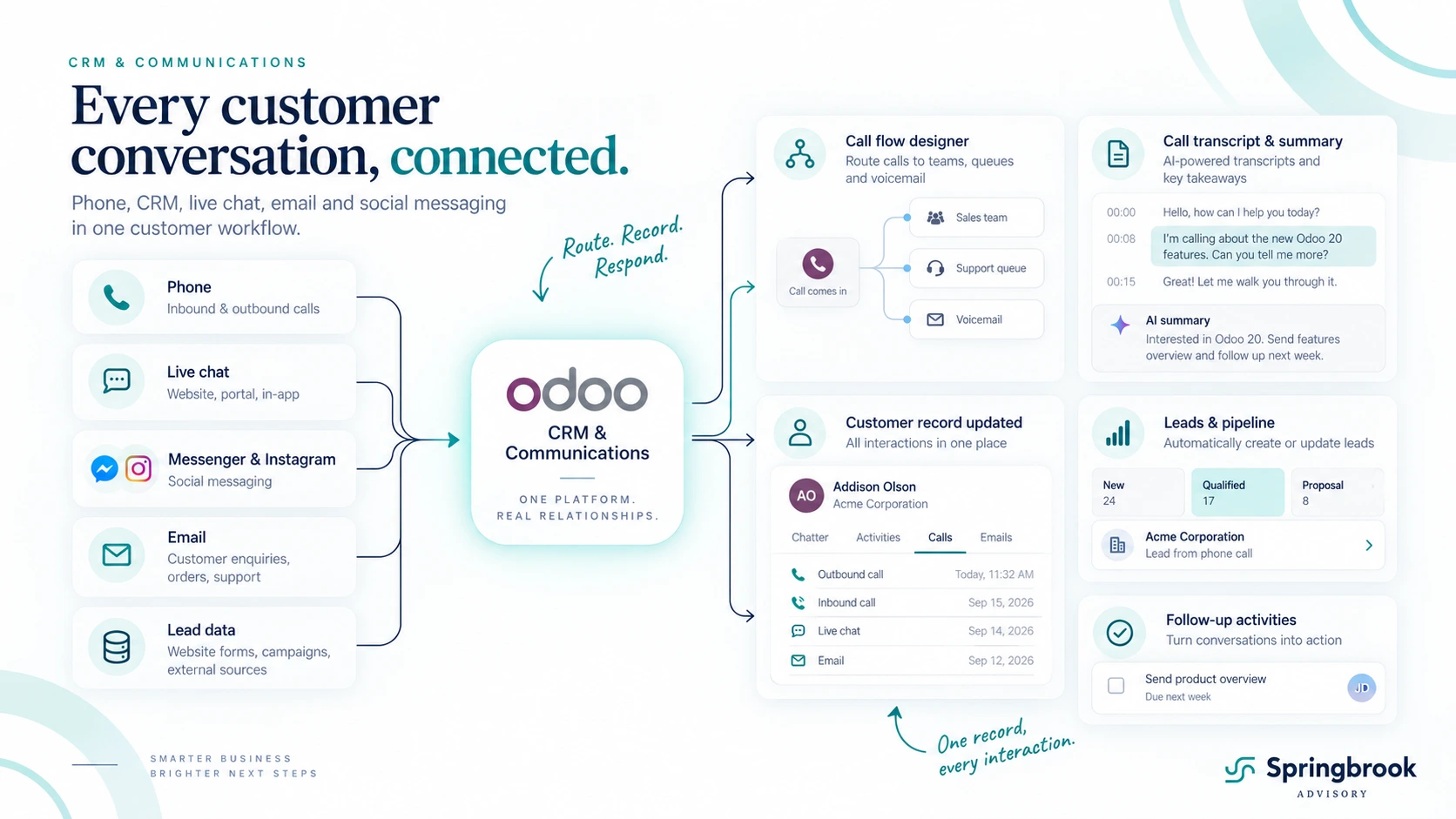
For a growing business, that means an incoming customer call can increasingly be handled much like it would be in a dedicated call-centre system:
customer calls → Odoo answers → menu or routing rules determine where the call goes → the right person or team receives it → the call is logged against the relevant customer record.
The Phone app also adds automatic number population and call logging from the record you are viewing, multiple outbound caller IDs, push notifications, a floating softphone, the ability to transfer a live call between devices and simultaneous calling.
For many small and mid-sized businesses, that could remove another standalone system from the technology stack. Odoo is not suddenly trying to replace every enterprise contact-centre platform, but the gap between “ERP with click-to-call” and “proper business phone system” has become dramatically smaller.
The wider communications stack is coming together as well. Messenger and Instagram direct messages can now feed into Odoo Live Chat teams, allowing staff to respond from Odoo rather than jumping between social platforms. Gmail and Outlook integrations can search for contacts, tasks and helpdesk tickets and log emails directly against those records.
Odoo Discuss also adds visibility over who is currently on a call, while recorded Discuss calls can be transcribed and summarised.
The important part is what happens when all of that sits beside CRM, Sales, Helpdesk, Subscriptions and Accounting.
A new prospect can be generated or enriched, automatically assigned to the right salesperson, contacted by email or phone, have the interaction recorded against the opportunity, receive a quotation and later become a customer — all without building integrations between five separate systems.
That is where Odoo 20 becomes particularly interesting.
It is increasingly difficult to describe Odoo as simply an ERP with a CRM module attached. For the right business, it is becoming the central operating system for the customer relationship, covering the commercial process and many of the communication channels around it.
And that is ultimately the appeal of the platform: fewer systems, fewer hand-offs and much less customer information disappearing into somebody else's inbox or phone system.
Implementation Changes
One of the quieter changes in Odoo 20 could have a substantial impact on implementation strategy.
Odoo is progressively removing dependencies that previously forced businesses to implement more functionality than they actually needed.
For example, eCommerce can now maintain simple on-hand stock without requiring the full Inventory application. Sales can manage fulfilment and send shipping confirmations without Inventory as well.
That matters for smaller businesses.
A company that primarily needs a better ordering process may not need a complete warehouse implementation on day one. A service business might begin with CRM, quoting and scheduling. A growing wholesaler might start with purchasing and inventory before moving finance across later.
ERP projects do not have to begin with a company-wide replacement program.
Sometimes the right starting point is simply:
“Which process is causing us the most pain?”
Solve that properly, build the foundations correctly and expand when the value is clear. A modern ERP implementation does not have to start by replacing everything.
Is your business ready for Christmas?
Pricing
Odoo 20 also comes with a significant pricing change.
Standard licence pricing has increased by approximately 20%. At first glance, that is obviously not insignificant.
The more interesting change, however, is the introduction of the new Lite User, priced at $12.90 per user per month.
Lite users are designed for people who need access to a more limited set of Odoo capabilities without requiring the access of a full user. Early demonstrations have shown Lite Users working with areas such as Employees, Attendances, Time Off, Planning and Documents.
For the right customer, that could materially offset the headline pricing increase.
A business with a relatively small number of power users but a much larger workforce that only needs employee, leave, attendance or similar functionality could potentially move a significant portion of users onto the lower-cost licence.
The important word there is potentially. The exact access model needs to be assessed against how each business uses Odoo.
The new licence could create substantial savings for businesses where many employees do not require full Odoo access. We are currently reviewing the practical use cases and will publish more detail shortly. Contact Springbrook if you would like us to assess the potential impact on your Odoo licensing.
This is an area we will cover separately once the access model has been tested across a wider range of real-world scenarios.
What Changes Now
The easiest way to misunderstand Odoo 20 would be to look at it as a long list of new software features.
The bigger shift is what those features allow a business to do.
AI can now participate directly in operational processes rather than simply generating text. Finance workflows are becoming more predictive and exception-focused. Inventory and manufacturing continue getting deeper. Field service is being consolidated around scheduling and resources. Australian payroll is progressing toward a genuinely integrated option, while still requiring sensible scoping for complex workforces. And the new Lite User model could make broader employee adoption considerably more economical.
Taken together, Odoo is continuing its move away from being a collection of business applications and toward becoming a connected operating platform for the business.
For prospective customers, that makes the question less about whether every existing system needs to be replaced immediately and more about where bringing processes together could generate the most value.
For existing Odoo customers, version 20 creates an opportunity to revisit workflows that may have been designed around limitations that no longer exist.
And the most interesting part is only beginning.
Agentic AI changes what business automation can look like when AI is connected directly to the systems where work actually happens. We will be exploring that in much more detail in our next article.
Want the full technical detail?
We’ve focused on the Odoo 20 changes we think have the greatest practical impact on businesses. Odoo’s complete release notes cover the hundreds of additional changes across the platform.
View the full Odoo 20 release notes →
What could Odoo 20 change in your business?
Whether you're considering Odoo for the first time or already running an Odoo environment, Springbrook can help you identify where the new capabilities create practical value.
